Project Set Up
Marven

Maven is an open-source "build automation" and "project management" tool widely used for Java applications.
As a build automation tool, it automates the "source code compilation" and "dependency management", assembles binary codes into packages, and executes test scripts.
creating a project
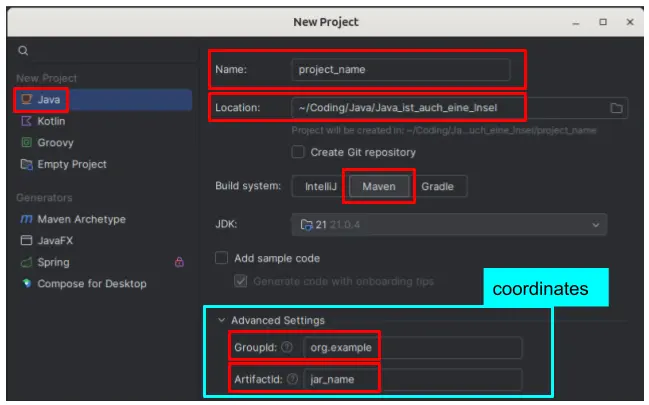
Coordinates
"Coordinates" refer to a set of identifiers that uniquely identify a specific artifact (such as a library or a project module). They are used to locate dependencies in repositories like Maven Central.
- Groupid: This identifies the group, organization, or company behind the artifact. It's typically written in reverse domain notation, like com.example.
- Artifactid: This is the name of the project or module, representing the specific artifact within the group. The name should be in lowercase letters and no strange symbols. For example, my-app.
File Structure
| file | explanation |
|---|---|
src/main/java | contains the "source code" |
src/main/resources | resources for the "source code" |
src/test/java | contains "test cases" |
target/classes | contains the built (executable) |
pom.xml (Project Object Model) | contains the project configuration (coordinates and dependencies) and description |
adding a class
- in the "file tree" on the left side: "right click" on the
src/main/javafolder to open the "context menu" to selectNew->Java Class