Interfaces
It allows you to specify a set of methods that a class MUST implement, without dictating how the methods should be implemented (if not overwrite default). This provides a way to achieve abstraction, where you can separate what an object does from how it does it. Interfaces enable "multiple inheritance" and define a contract that a class must adhere to.
1. Basic Syntax
- "Define the Interface":
- "HEAD":
- without modifier then it is only visible within the package (but the classes which use the interface can be used outside if they are
public)
interface NAME { BODY }publicthan it can be imported into other packages.
public interface NAME { BODY } - without modifier then it is only visible within the package (but the classes which use the interface can be used outside if they are
- "BODY":
- Contains the methods and constants, see below "method definitions".
- "HEAD":
- "Implement the Interface":
- "in an class":
- A class can have multiple interfaces, but it MUST implement all the interfaces methods.
class SomeClass implements SomeInterface, AnotherInterface { STATEMENTS;}
- A class can have multiple interfaces, but it MUST implement all the interfaces methods.
- "in an class":
2. Characteristics of Interfaces
-
Method Definitions:
-
"public and abstract":
interface NAME { R_TYPE M_NAME(PARA);}
Originally (until Java 8) an interface contains only the signature (+ return type) of the method and not it's implementation, All methods in an interface are implicitlypublicandabstract(the keywords are not needed).example: original, public and abstract interface method
- The Animal interface defines two abstract methods:
eat()andsleep().
define the interface 'Animal'// Define an interface with abstract methods
public interface Animal {
void eat(); // Abstract method (no body, implementation)
void sleep();
}- The
Dogclass implements theAnimalinterface and provides concrete implementations for these methods using the@Overrideannotation.
the 'dog' class implements the 'Animal' interfacepublic class Dog implements Animal {
@Override // Instructs the compiler that you intend to override a method in the superclass.
public void eat() {
System.out.println("Dog is eating.");
}
@Override
public void sleep() {
System.out.println("Dog is sleeping.");
}
} - The Animal interface defines two abstract methods:
-
"default":
interface NAME { default R_TYPE M_NAME(PARA){STATEMENT;}}
Since Java 8, there is adefaultinterface containing signature and implementation, which can be overwritten by the class.example: default interface method
Animal.javapublic interface Animal {
default void eat() {
System.out.println("Is eating.");
}
default void sleep() {
System.out.println("Is sleeping.");
}
}Dog.javapublic class Dog implements Animal {
@Override // Instructs the compiler that you intend to override a method in the superclass.
public void eat() {
System.out.println("Dog is eating.");
}
// public void sleep(); //'default' interfaces does not need to be implemented again
}InterfaceTest.javapublic static void main(String[] args) {
Dog dachshund = new Dog();
dachshund.eat(); //OUTPUT: 'Dog is eating.'
dachshund.sleep(); //OUTPUT: 'Is sleeping.'
} -
"static":
interface NAME { static R_TYPE M_NAME(PARA){STATEMENT;}}
A static method in an interface is associated with the interface itself, rather than any class implementing it. The interface has to be instantiated directly for the static method to be available and is not available with the object.example: static interface method
IFHello.javapublic interface PrintHello {
static void sayHello(String name) {
System.out.println("Hello " + name + "!");
}
}InterfaceTest.javapublic static void main(String[] args) {
PrintHello.sayHello("Zolsk"); // Calling the static method from the interface
}- The interface does not need to be instantiated to call the method and is only available in this form. If you would have 'implemented' the interface in an class and instantiated an object from the class, the 'static' method would not be available on the object.
-
"private":
interface NAME { private R_TYPE NAME(PARA){STATEMENT;}}
Since Java 9, interfaces can have private methods which are only accessible within the interface to keep the code dry.example: private interface methods
public interface Calculator {
    default int add(int a, int b) {
        log("Adding numbers");
        return a + b;
    }

    default int subtract(int a, int b) {
        log("Subtracting numbers");
        return a - b;
    }

    // Private method, only visible and usable in the interface
    private void log(String message) {
        System.out.println("LOG: " + message);
    }
}- In the above example, the log method is used by both add and subtract methods, but it's not visible to classes implementing the Calculator interface.
-
-
Constants:
interface NAME { D_TYPE NAME = VALUE;}-
Fields in an interface are implicitly
public,static, andfinal. This means that they are constants that cannot be changed and belong to the interface itself, not to instances of classes implementing the interface.example: constants interface variable
interface ConVar {
    public static final int CONST_1 = 1;
    int CONST_2 = 2;                     // the same as above
}
public class Dog implements ConVar{
@Override public void eat() {
System.out.println("Dog is eating. " + (CONST_1 + CONST_2));
}
// Constant values are available in the class in which the interface is implemented
}public class InterfaceTest {
public static void main(String[] args) {
Dog dachshund = new Dog();
dachshund.eat(); //Output: 'Dog is eating. 3'
System.out.println(ConVar.CONST_1); //Output: '1'
System.out.println(dachshund.CONST_1); //CONSTANT is not visible
}
}
-
2. Inheritance and Implementation
Extending Interfaces
-
An interface can extend other interfaces using the
extendskeyword, inheriting their methods and constants.example: extending interfaces
public interface Animal {
    void eat();
}

public interface Mammal extends Animal {  // 'Mammal' includes 'Animal' interface
    void run();
}

public class Dog implements Mammal {
    @Override
    public void eat() {
        System.out.println("Dog is eating.");
    }

    @Override
    public void run() {
        System.out.println("Dog is running.");
    }
}
Multiple Interfaces
-
A class can implement multiple interfaces, which provides a way to achieve multiple inheritance in Java.
example: multiple inheritance
public interface Flyable {
    void fly();
}

public interface Swimmable {
    void swim();
}

// Class implementing multiple interfaces
public class Duck implements Flyable, Swimmable {
    @Override
    public void fly() {
        System.out.println("Duck is flying.");
    }

    @Override
    public void swim() {
        System.out.println("Duck is swimming.");
    }
}
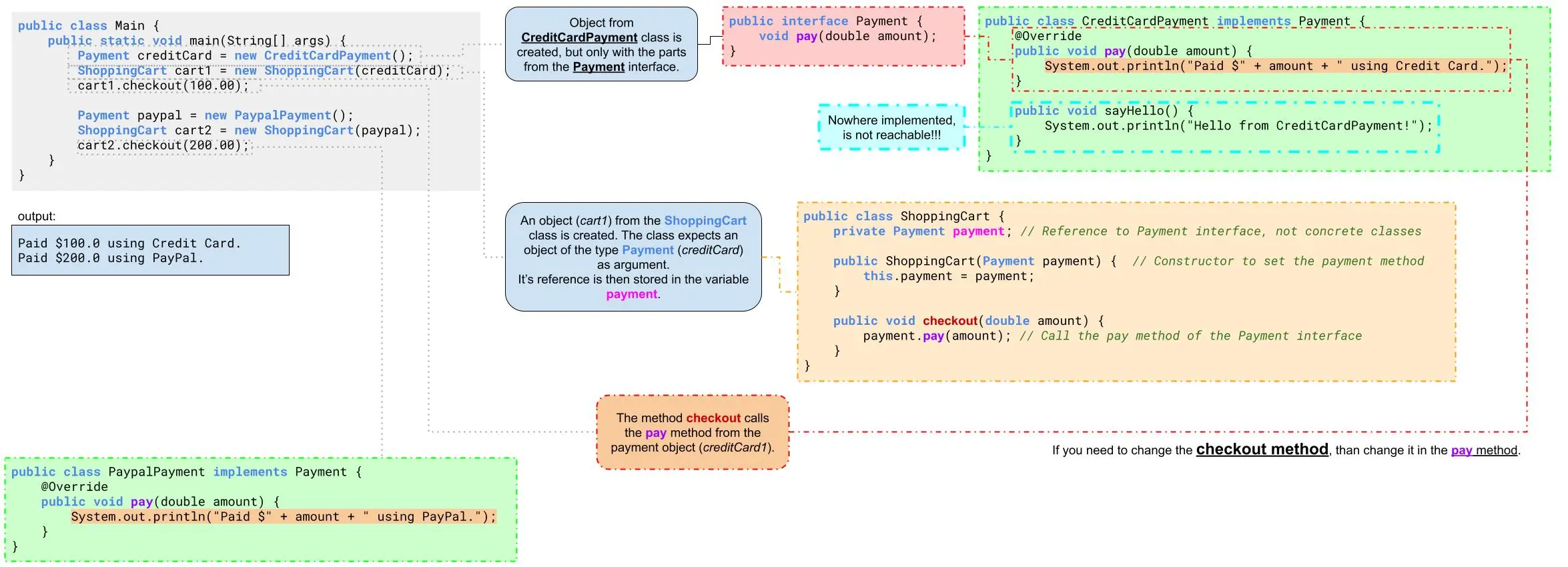
Loose Coupling
Interfaces decouple the code, meaning that classes can interact with each other through interfaces rather than specific implementations. This makes the codebase more flexible and easier to change.
For example, if you want to change the implementation of a class that a method depends on, you only need to modify the class itself, not the methods using it.
example: loose coupling
public interface Payment {
    void pay(double amount);
}

public class CreditCardPayment implements Payment {
    @Override
    public void pay(double amount) {
        System.out.println("Paying with credit card: " + amount);
    }
}

public class PaymentProcessor {
    private Payment payment;

    public PaymentProcessor(Payment payment) {
        this.payment = payment;
    }

    public void processPayment(double amount) {
        payment.pay(amount);  // Interacts through interface, not specific implementation.
    }
}
In the above example, the PaymentProcessor class does not depend on a specific type of payment method. You can pass any class implementing the Payment interface
(e.g., CreditCardPayment, DebitCardPayment), making it flexible and easily extendable.
example: payment loose coupling
// Main.java (Testing the ShoppingCart with Different Payment Methods)
public class Main {
    public static void main(String[] args) {
        Payment creditCard = new CreditCardPayment();
        creditCard.sayHello(); // not exist, because it is not part of the Payment interface
        ShoppingCart cart1 = new ShoppingCart(creditCard);
        cart1.checkout(100.00); // Output: Paid $100.0 using Credit Card.

        Payment paypal = new PaypalPayment();
        ShoppingCart cart2 = new ShoppingCart(paypal);
        cart2.checkout(200.00); // Output: Paid $200.0 using PayPal.
    }
}
- line 7:
If you want to change how thecheckoutmethod forCreditCardPaymentworks, than you only need to change "line 4" in theCreditCardPaymentclass.
public interface Payment {
    void pay(double amount);
}
public class CreditCardPayment implements Payment {
    @Override
    public void pay(double amount) {
        System.out.println("Paid $" + amount + " using Credit Card.");
    }

    public void sayHello() {
        System.out.println("Hello from CreditCardPayment!");
    }
}
class PaypalPayment implements Payment {
    @Override
    public void pay(double amount) {
        System.out.println("Paid $" + amount + " using PayPal.");
    }
}
public class ShoppingCart {
    private Payment payment; // Reference to Payment interface, not concrete classes

    // Constructor to set the payment method
    public ShoppingCart(Payment payment) {
        this.payment = payment;
    }

    public void checkout(double amount) {
        payment.pay(amount); // Call the pay method of the Payment interface
    }
}