Basic Elements
The syntax of a Java program defines the "tokens" and thus forms the vocabulary.
However, correctly written programs do not have to be correct. We therefore use the term "semantics" to summarize the meaning of a "syntactically correct program". "Semantics" determine what the program does.
The order of abstraction is: lexicals (allowed symbols) syntax and semantics. The compiler goes through these steps before it can generate the bytecode.
Token
A token is a lexical unit that provides the compiler with the building blocks of the program.
The compiler uses the grammar of a language to recognize which sequences of characters form a token.
For identifiers, for example, this means: "Take the next characters as long as a letter is followed only by letters or numbers."
Separator
Are characters or sequences of characters used to separate tokens, code blocks, or logical segments.
Separators are essential in structuring Java code and defining scope, control flow, and data structures.
| separator | explanation |
|---|---|
| Whitespace | Spaces, tabs, "line feeds" and "form feeds". These characters have no meaning except as separators. They can be used in any number and help to make the code more readable to humans. |
Parentheses ( ) | -> Method calls: Enclosing arguments to be passed to methods. -> Control structures: Enclosing conditions in control structures like if, while, for. -> Precedence grouping: In arithmetic expressions to control order of evaluation. |
Braces { } | Define a block of code or a scope, typically: -> For method bodies, class bodies, or control structure blocks (if, for, while, etc.). -> For defining a static or instance initialization block. |
Semicolon ; | Marks the end of a statement. Java requires semicolons at the end of every executable statement except in control structures where blocks are used. |
Comma , | Used to separate multiple items in: -> Variable declarations. -> Method arguments. -> For loop headers. for (int i = 0, j = 10; i < j; i++, j--) {} |
Period (Dot) . | -> Accessing class members (fields and methods). -> Separating package names in fully qualified class names. -> Accessing methods of an object. -> Calling methods on object instances or classes. |
Colon : | -> In enhanced for loops (for-each) to separate the variable and the collection being iterated over. -> In ternary operators as part of the conditional statement. (a > b) ? a : b;-> In labeled statements (though rarely used). |
Double Colon :: (Method Reference Operator) | To refer to a method or constructor without invoking it, often in the context of lambda expressions. |
Ellipsis ... (Varargs) | Used in method parameter declarations to indicate that the method accepts a variable number of arguments. |
At symbol @ | Used for annotations in Java. Annotations provide metadata about the code and do not directly affect program logic. |
Identifier
Is a name used to identify variables, methods, classes, packages, or any other user-defined item.
Rules for a Valid Identifier:
- Must begin with a letter
a-zorA-Z, underscore_, or dollar sign$.
(NOTE: only use letters from the english alphabet, even only the letters from ISO 8859-1 (Latin-1) would be allowed.) - Subsequent characters can also include digits.
- No spaces are allowed.
- Can not be a reserved keyword (like int, class, if, else, while, etc.). NOTE: the single underscore
_is a reserved keyword. - Identifiers are case-sensitive.
- No length limit.
Details
| valid identifier | explanation |
|---|---|
Mami | Contains alphabetic characters. |
__RAPHAEL_IS_NICE__ | Underscore is valid. |
Bóolêáñ | Contains letters from ISO 8859-1 (Latin-1). |
α | Contains letters from ISO 8859-1 (Latin-1). |
REZE$$SION | Doller sign is valid. |
¥€$ | Contains letters from ISO 8859-1 (Latin-1). |
| invalid identifier | explanation |
|---|---|
2plus2is4 | First character must be a letter (a-z) or underscore. |
get your shots | Contains whitespace. |
faster! | Most symbols are not allowed, such as the exclamation mark. |
nullclass | Keywords are not allowed. |
_ | A single underscore is a keyword. |
Naming Conventions
- For variables and methods, use camelCase (e.g.,
myVariable,calculateTotal). - For class names, use PascalCase (e.g.,
MyClass,OrderProcessor). - For constants, use ALL_CAPS with underscores separating words (e.g.,
MAX_VALUE,PI).
Literals
Are fixed values that are directly written in the code. They represent constant values that the program does not compute but directly uses as-is.
Literals are classified based on the type of value they represent:
-
Integer Literals
Represent whole numbers without any decimal points. They can be written in different bases (base converter):base notation example Decimal base 10 Normal integer numbers 10// Decimal 10Binary base 2 Prefix with 0bor0B0b1010// Binary for 10Octal base 8 Prefix with 00123// Octal for 83Hexadecimal base 16 Prefix with 0xor0X0x1A// Hexadecimal for 26`(NOTE: in all bases the notation refers to
0as in zero not in the characterO.)
Adding the suffixLorlchanges the default type frominttolong, e.g.100L,0b1010L. -
Floating-Point Literals
Represent numbers with fractional parts (decimals), e.g.12.567.
Adding the suffixForfchanges the default type fromdoubletofloat, e.g.12.567F.
e or EIs used to shorten floating-point literals, e or E followed by the the number of zero digits to the floating point.
e.g.: 123e2 --> 12300.0 , a minus moves the floating point into the other direction 1E-2 --> 0.01.
_Is used to increase readability in large numbers. It can be placed between digits in integer and floating-point literals but not at the beginning, end, or next to a decimal point or suffix, e.g. 1234_5678_9012_3456 .
-
Character Literals
Represent a single character enclosed in single quotes' ', e.g.'A','1','@'.
Some characters are escaped by a prefixed\backslash, which changes there meaning:Escape Sequence Meaning \nNewline \tTab \'Single quote \"Double quote \\Backslash -
String Literals Represent a sequence of characters enclosed in double quotes
" ". Strings in Java are instances of the String class. e.g."Hello, World!",""(empty string),"He, \"What is up!\""("need to be escaped\") . -
Boolean Literals
Represent one of two values:trueorfalse. -
Null Literal
Represents the "null reference", which means a variable does not refer to any object and is used with objects.
Comments
Are ignored (removed from byte code) by the compiler, but also separate the code, e.g.: 1/*2*/3 is seen by the compiler as 1 and 3 and not 13.
-
Single-line Comments
Start with//and reach to the end of the line. Commonly used to temporary "comment out" code. -
Multi-line Comments
Start with/*and end with*/, could be placed any where in the code, but can not be nested. -
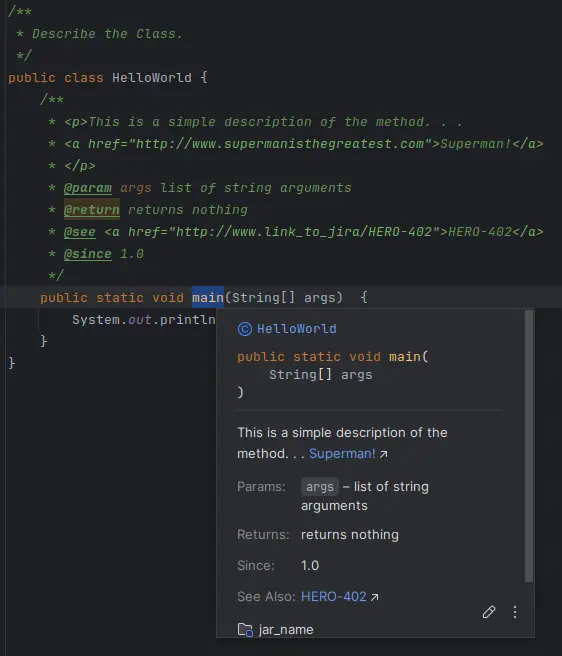
Javadoc Comments
Start with/**and end with*/, generates an API documentation from the content, which can be viewed in the ide by "mouse over" the identifier of the method or class. Helps to describe what the method is doing, what argument are needed and what it returns.